I built the first version of the Universal Document Formatter because I was tired of doing the same small task after finishing a piece of writing: reformatting it for wherever I wanted to share it.
The idea was simple. Paste the text once, choose a destination, and spend less time adjusting paragraph breaks or splitting a long post by hand.
That first prototype took about two hours. I’ve continued developing it since then, with the same goal: make the last step between writing and sharing a little easier.
A small problem worth solving
Preparing the same idea for several platforms creates a surprising amount of friction. The writing was done, but sharing it still meant another round of copying, spacing, checking, and editing.
I started by talking through that problem with Claude, then used AI-assisted development with Bolt.new to build a working prototype. A text input, a platform selector, and a preview were enough to test the idea.
The two-hour timeline belongs to that first prototype. Getting something working quickly was useful; returning to it and making the experience clearer has been another part of the project.
Make the next step obvious
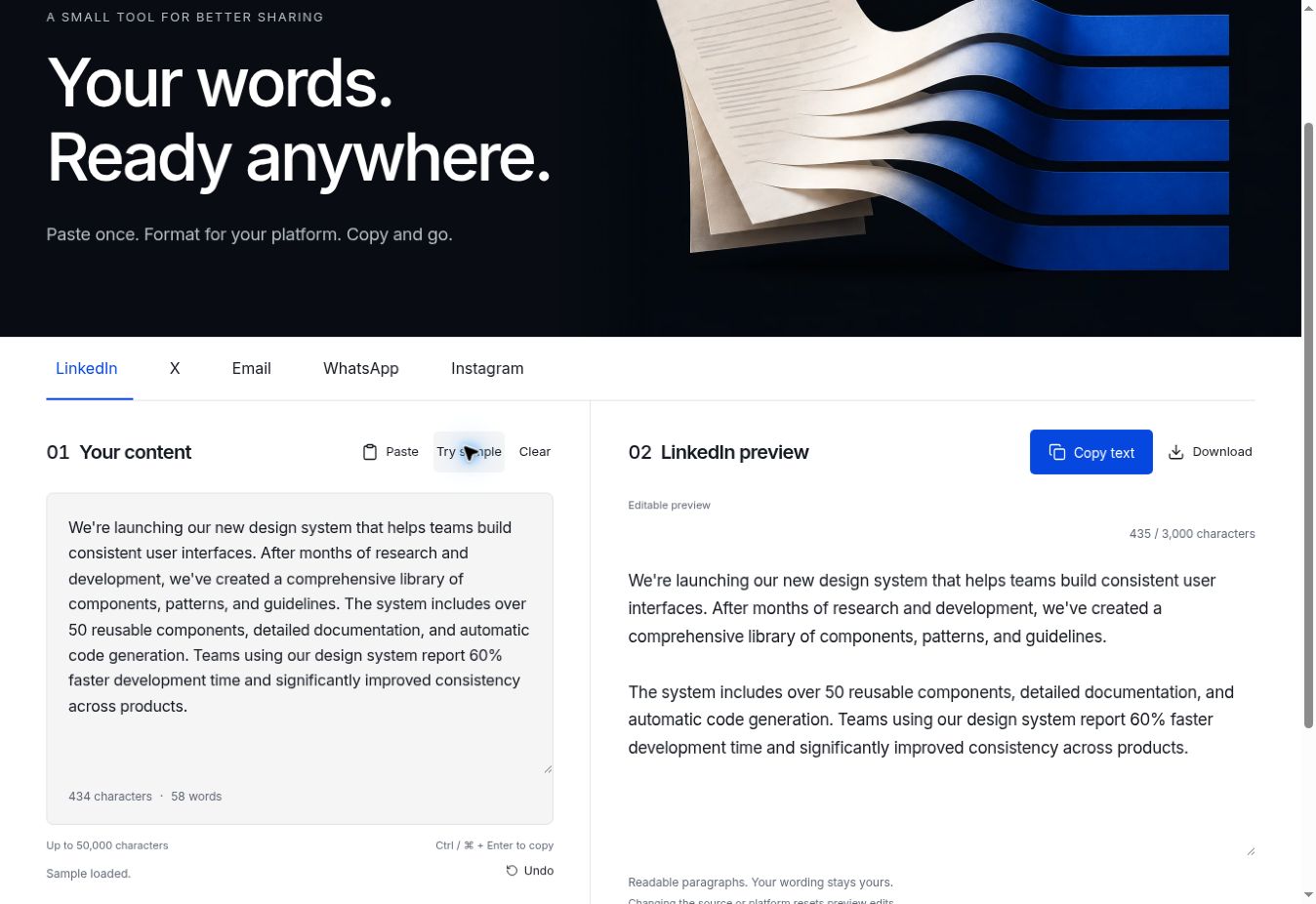
The app’s purpose is straightforward: “Your words. Ready anywhere.” Below it, the platform tabs lead directly into your content and an editable preview.
The editor and preview sit side by side on wider screens. Copy and download controls live with the output, so the next step is easy to find. Light and dark modes let you choose the appearance that works for you.
You can also load sample text to see the tool in action before pasting anything of your own. Character and word counts help you understand the input, while the preview gives you a place to make final adjustments.
You can review and edit the result before taking it to the platform where you plan to share it.
What the app does today
The current version has five destinations:
- LinkedIn: adds readable paragraph spacing and shows a character count beside an editable preview.
- X: turns longer text into numbered posts, with editable text and character counts for each one. You can copy an individual post or the whole thread.
- Email: prepares clean paragraphs to paste into your email. You add the greeting, subject, and sign-off that fit the recipient.
- WhatsApp: provides a dedicated formatting destination and a preview you can adjust before copying.
- Instagram: cleans up caption spacing and shows the character count without cutting your words.
The workflow is straightforward: paste your text, choose a tab, review the output, then copy or download it. No account is needed, and formatting happens in your browser.
One detail to know: changing the source text or switching platforms resets edits made in the preview. Finish choosing your destination before making those final tweaks.
This is a formatting tool. You still decide what to say and where to publish it. It does not post to your accounts, and a formatted preview is still worth reviewing in the destination app before you share.
What this project keeps teaching me
Starting with a problem I understood gave the prototype a clear purpose. It did not need a long feature list to be worth building.
But solving my own problem is a starting point, not proof that the experience works for everyone. A quick prototype can show that an idea is possible. Clear controls, useful previews, and continued refinement help make it something another person can pick up and use.
This project shows how a specific everyday frustration can become a working tool quickly, then improve through use. The question I keep coming back to is: what repetitive task in your day is small enough to solve, but annoying enough that you keep noticing it?
Try it with your own writing
Bring a post, an email draft, or a few paragraphs you want to share. Choose a destination, make any final edits, and take the result with you.
Open the Universal Document Formatter ↗
View the project on GitHub ↗
Have a similar workflow you want to simplify? Let’s connect.